Introduction
The internet offers countless ways to discover digital media, explore online platforms, and find content that matches individual interests. However, not every website provides the same experience, and users should take a moment to understand a platform before deciding how to interact with it.
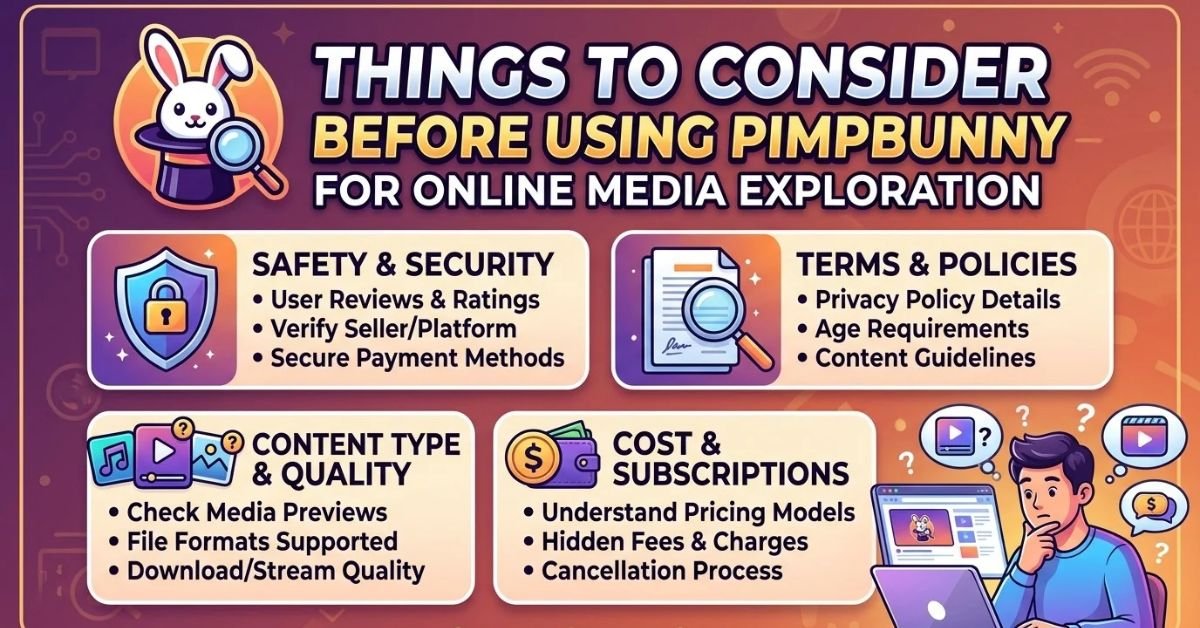
PimpBunny is a name associated with online media exploration, and anyone considering visiting the website should approach the experience with awareness, sensible expectations, and attention to online safety.
Using a media website involves more than opening a page and browsing its available material. Factors such as privacy, website reliability, content suitability, device compatibility, and personal preferences can all influence the experience. Understanding these considerations beforehand can help visitors make more responsible decisions and avoid unnecessary risks.
This guide takes a practical, straightforward approach to the subject. Rather than assuming that every online platform offers the same features or protections, it explains what users should evaluate before exploring PimpBunny or any similar media-sharing website.
1. Understand the Website Before Getting Started
The first step in exploring any online platform is understanding its general purpose. Websites may focus on media discovery, user-submitted material, categorized content, streaming, or links to resources hosted elsewhere. These differences affect how visitors navigate the platform and what they should expect from it.
Before using PimpBunny, take a moment to review the website’s visible pages and available information. Look for an introduction, an explanation of its purpose, or other details that clarify how the platform operates. Avoid assuming that a particular feature exists simply because it is common on other media websites.
It is also useful to understand the distinction between a website that hosts content directly and one that directs visitors to external sources. If the platform links to third-party pages, the privacy policies, advertising practices, and safety conditions of those destinations may differ from those of the original website.
A sensible starting point: Understand what a platform appears to offer before interacting with its content, creating an account, or following external links.
2. Evaluate Privacy Before Sharing Personal Information
Privacy deserves attention whenever you visit a website, particularly when the material you explore may be personal or sensitive in nature. Some visitors browse anonymously, while others create accounts or interact with websites through comments, subscriptions, or other features.
Before providing information to PimpBunny, determine whether the website actually requires it. If a page can be viewed without registration, consider whether creating an account offers a clear benefit. Avoid supplying personal details simply because a form requests them.
Information that deserves particular protection includes:
- Your full name and home address.
- Personal telephone numbers and private email addresses.
- Financial information and payment credentials.
- Account passwords and authentication codes.
- Personal photographs or files that you do not want publicly distributed.
Read any available privacy policy to understand what information may be collected, why it may be collected, and whether it may be shared with other parties. Pay attention to explanations concerning cookies, analytics, advertising technologies, and data retention.
Keep in mind that a privacy policy is a statement of practices, not an automatic guarantee that every risk has been eliminated. If a website offers little information about how it handles personal data, treat that uncertainty as a reason to be cautious.
3. Check Website Authenticity and Connection Security
Before exploring a website, confirm that you are visiting the intended domain. Search results, advertisements, social media posts, and messages can sometimes lead to imitation websites designed to collect information or distribute unwanted software.
Check the spelling of the domain carefully, especially if you reached the website through an unfamiliar link. Watch for unusual addresses, misleading redirects, unexpected pop-ups, and pages that imitate the appearance of another service.
A secure HTTPS connection is an important basic safeguard because it encrypts information exchanged between your browser and the website. However, HTTPS alone does not prove that a website is legitimate, trustworthy, or free from harmful content.
Other warning signs may include:
- Requests for unnecessary personal information.
- Unexpected downloads that begin without your consent.
- Messages claiming that your device is infected and demanding immediate action.
- Prompts asking you to install unfamiliar browser extensions.
- Suspicious payment requests or promises that seem unrealistic.
- Repeated redirects to unrelated websites.
If something appears questionable, close the page rather than attempting to work around the warning. Protecting your device and personal information is more important than accessing a particular page.
4. Consider Whether the Available Content Is Appropriate
Online media platforms can contain material intended for different audiences. Before browsing, consider the nature of the content that may be available and whether it is suitable for your age, circumstances, and personal preferences.
If a website contains adult-oriented material, visitors should comply with applicable age requirements and local laws. Anyone who is under the required legal age should not access restricted content.
Content labels and categories can help users understand what a page may contain, but labels are not always complete or accurate. If the description is unclear, avoid opening the material until you have enough information to make an informed decision.
It is equally important to respect the rights and boundaries of other people. Do not download, redistribute, or share material when you lack permission or when doing so would violate applicable laws or the rights of the people depicted.
Responsible media exploration involves both personal judgment and respect for the people who create, appear in, or own the content.
5. Understand Copyright and Content Ownership
Digital media is easy to copy, but accessibility does not automatically mean that a file is free to use. Photographs, videos, illustrations, audio recordings, and other creative works may be protected by copyright or additional legal rights.
Before saving or sharing material found through PimpBunny, consider whether the creator has authorized that use. The fact that content appears on a public webpage does not necessarily give visitors permission to reproduce it, publish it elsewhere, or use it commercially.
When ownership or permission is unclear, the safest approach is to avoid redistribution and look for reliable information about the content’s origin.
Users should also be alert to material that may have been uploaded without the consent of the people involved. If content appears exploitative, unlawfully distributed, or otherwise abusive, do not download or circulate it. Use an appropriate reporting channel where one is available.
Respecting copyright and consent supports a healthier digital environment and reduces the likelihood of causing harm to others.
6. Examine Navigation and Overall Usability
A website’s design can influence how easily visitors find information and recognize potentially unsafe elements. Clear navigation, readable text, consistent labels, and understandable controls generally make a browsing experience easier to manage.
When visiting PimpBunny, observe how its pages are organized. Are the available categories understandable? Can you distinguish the main content from advertisements? Are important links clearly labeled? Does the website explain what happens when you select a particular option?
These questions are useful even when a website appears simple. Confusing layouts can make it difficult to identify legitimate controls, while deceptive interface elements may encourage accidental clicks.
Pay particular attention to buttons that imitate download links or play controls. Some websites use advertisements that resemble ordinary navigation elements. If a button opens an unrelated page or requests an unexpected installation, return to the original page and reconsider whether continuing is worthwhile.
A good browsing experience should allow users to make deliberate choices without being pressured into clicking unfamiliar elements.
7. Think About Advertising and Third-Party Redirects
Advertising is common across free online platforms, but advertising methods vary considerably. Some advertisements are relatively unobtrusive, while others may introduce pop-ups, tracking technologies, misleading promotions, or redirects to external websites.
Before using PimpBunny, consider how comfortable you are with the advertising environment you encounter. Do not assume that every advertisement displayed on a website has been independently verified by that website’s operators.
Use the following precautions when dealing with online advertisements:
- Avoid advertisements that make exaggerated claims or create a false sense of urgency.
- Do not enter payment information on an unfamiliar destination without checking its legitimacy.
- Decline notification requests from websites you do not trust.
- Close unexpected tabs rather than following repeated redirects.
- Never install software merely because an advertisement says it is necessary to view content.
- Review browser permissions if a website requests access to notifications, your camera, your microphone, or your location.
If advertising makes the website difficult to use safely, leaving the page may be the most practical choice.
8. Check Compatibility With Your Device and Browser
The browsing experience can vary depending on your device, operating system, browser, connection quality, and screen size. A page that works smoothly on a desktop computer may behave differently on a mobile phone.
Before exploring a media website extensively, make sure your browser is updated and compatible with current web standards. Updates often include important security improvements as well as performance and compatibility fixes.
On mobile devices, pay attention to unexpected redirects, excessive battery use, unfamiliar notifications, and pages that request permissions unrelated to their apparent purpose. On desktop computers, be careful with downloaded files and browser extensions.
It is also worth considering whether the website functions properly with your accessibility settings. Readable text, usable keyboard navigation, clear contrast, and support for browser zoom can make a meaningful difference for people with different needs.
If a website repeatedly fails to load, behaves unpredictably, or requires unusual changes to your device settings, do not disable security protections simply to make it work. A platform should not require you to compromise basic device safety for ordinary browsing.
9. Protect Your Device From Unwanted Downloads
One of the most important rules for online media exploration is to distinguish between viewing content and installing software. A website should not automatically be trusted simply because it displays media or offers a download button.
Files can have misleading names, and a file’s appearance does not establish that it is safe. Executable files, compressed archives, browser extensions, and applications from unknown sources deserve particular caution.
When browsing PimpBunny or a similar platform, consider these basic safeguards:
Keep your software updated. Use a supported operating system and current browser version so that known security weaknesses are less likely to remain unpatched.
Use reputable security protection. Keep your device’s built-in or trusted security tools active and pay attention to legitimate warnings.
Avoid unnecessary installations. Do not install a special player, codec, extension, or application unless you can independently verify that it is legitimate and genuinely needed.
Review downloads before opening them. Check the source, file type, and expected purpose. If a file arrives unexpectedly, do not open it.
Maintain backups. Important files should have a separate backup so that a device problem does not automatically become permanent data loss.
These habits apply to the wider internet, not only to any single media website.
10. Know the Difference Between Free Access and Hidden Costs
Some websites allow visitors to browse without payment, while others may offer paid subscriptions, premium services, or third-party promotions. The presence of a free page does not necessarily mean every linked service is free.
Before agreeing to a payment or subscription connected with PimpBunny, establish exactly who is requesting the money and what is being offered. Read the terms carefully, including renewal conditions, cancellation procedures, and any additional charges.
Be particularly cautious if a page requests card information to verify your identity without providing a clear explanation. Do not assume that a payment prompt belongs to the original website when it appears after a redirect.
If you decide to pay for an online service, use a reputable payment method and retain relevant transaction records. Never share one-time authentication codes or account passwords with a person claiming to provide access or support.
If pricing or billing terms are difficult to understand, pause before proceeding. A legitimate financial decision should not depend on confusion or pressure.
11. Consider Legal Requirements and Local Rules
Online access does not remove legal responsibilities. Laws concerning age-restricted content, copyright, privacy, digital distribution, and prohibited material differ between jurisdictions.
Before using PimpBunny, make sure that your intended activity complies with the rules that apply where you live. Do not assume that content available on a website is lawful to access, download, possess, or redistribute in every location.
Legal concerns may also arise when material is shared without permission, when private content is distributed without consent, or when a user attempts to bypass restrictions imposed by law.
If you are uncertain about a particular activity, consult a reliable official source or qualified legal professional rather than relying solely on comments from other internet users.
A responsible approach to online media includes understanding not just what a website makes accessible, but also what you are permitted to do with the material you encounter.
12. Manage Cookies, Tracking, and Browser Permissions
Websites may use cookies and similar technologies to maintain sessions, remember preferences, measure traffic, or support advertising. The exact technologies and purposes depend on the individual website and its partners.
Review the cookie information and privacy choices available on the site. Where practical, use browser settings to manage cookies and limit third-party tracking according to your preferences.
Private browsing or incognito mode can reduce the amount of browsing history saved locally after a session. However, it does not make you completely anonymous. Websites, network administrators, internet service providers, and other parties may still be able to observe some activity, depending on the circumstances.
Browser permissions also deserve regular attention. A media website usually should not need access to every device feature. Grant access only when you understand why it is being requested and are comfortable with the consequences.
Periodically review saved permissions, notification settings, and unfamiliar extensions. Removing access that you no longer need can help reduce unnecessary exposure.
13. Set Personal Boundaries for Online Exploration
A useful online experience should fit comfortably within your time, interests, and responsibilities. Media platforms can encourage extended browsing through recommendations, continuously available pages, or frequently updated material.
Before exploring PimpBunny, consider what you want to accomplish and how much time you intend to spend. Clear personal boundaries can help prevent casual browsing from interfering with sleep, work, education, relationships, or other priorities.
It can also be helpful to reflect on how the experience affects you. If certain material makes you uncomfortable, causes distress, or conflicts with your personal values, you do not need to continue viewing it.
Online exploration is a personal choice, and users should feel free to leave a platform whenever the experience no longer meets their needs. There is no obligation to continue simply because a website is available.
14. Evaluate Trust Without Relying on Appearance Alone
A professional-looking website is not automatically trustworthy, just as a simple design does not necessarily indicate a problem. Visual presentation can offer clues about usability, but it cannot establish the quality of a platform’s security, moderation, or privacy practices.
When evaluating PimpBunny, look for information that can be assessed rather than relying exclusively on appearance or promotional language.
Useful questions include:
- Is the website’s purpose explained clearly?
- Are contact or support details available where appropriate?
- Can you find understandable privacy information and terms of use?
- Are content descriptions and navigation labels reasonably clear?
- Does the website avoid suspicious demands and deceptive prompts?
- Are there signs that external links lead to unrelated or questionable destinations?
Independent information may also provide context, but reviews should be assessed critically. Anonymous comments, promotional articles, and repeated claims without evidence may not provide a reliable picture of a website’s actual practices.
If important information is missing, acknowledge the uncertainty instead of assuming the platform is either completely safe or necessarily harmful.
15. Know What to Do if Something Goes Wrong
Even careful users may encounter a suspicious page, unwanted notification, questionable download, or unexpected request. Having a response plan makes it easier to act calmly.
If a page redirects you repeatedly, close it and avoid returning through the same suspicious link. If you accidentally grant a browser permission, review the relevant settings and revoke access where appropriate.
If you download a suspicious file, do not open it. Use trusted security software to assess the file and follow the software’s recommended guidance. If you installed an unfamiliar application, review the device’s installed programs and remove it if it is unsafe, using a trusted removal process.
If you entered a password on a page you later suspect was fraudulent, change that password through the legitimate service’s official website. Change it anywhere else you reused it, and enable multifactor authentication where available.
If you shared financial information, contact the relevant financial institution through its official contact channel and explain the situation. If private information or content was exposed, document what happened and use appropriate reporting or support channels.
The most important principle is to respond promptly without interacting further with suspicious messages or instructions.
16. Make a Personal Checklist Before Browsing
Before using PimpBunny for online media exploration, take a moment to review the following checklist:
- Confirm that you have reached the intended website.
- Understand the platform’s apparent purpose and available information.
- Review privacy terms before submitting personal details.
- Check whether the content is appropriate and lawful for you to access.
- Keep your browser, operating system, and security tools updated.
- Avoid suspicious advertisements, redirects, downloads, and extensions.
- Do not provide payment details without understanding the transaction.
- Respect copyright, consent, and content ownership.
- Manage cookies and browser permissions according to your preferences.
- Leave the website if its behavior creates concerns or requires unnecessary risks.
This checklist is not a guarantee of complete safety, but it provides a practical foundation for more informed browsing.
Conclusion: Explore With Awareness, Not Assumptions
PimpBunny, like any online media destination, should be approached with a clear understanding of your expectations and responsibilities. Before exploring the website, consider its purpose, privacy practices, content suitability, technical behavior, and the reliability of the pages you encounter.
The key is to avoid making decisions based on a website’s name, appearance, or promotional claims alone. Verify what you can, protect personal information, keep your device secure, and be cautious when interacting with third-party links or downloads.
Online media exploration can be more manageable when users take responsibility for their choices and recognize the limits of what they know about a platform. A few moments spent evaluating a website can help prevent unnecessary problems later.
Ultimately, the best approach is simple: browse thoughtfully, respect other people’s rights, protect your digital privacy, and stop whenever a website gives you a reason to doubt its reliability. These principles apply not only to PimpBunny but to virtually every media-sharing platform across today’s digital landscape.